











































So, you’ve spent all week painstakingly tweaking your Blender projects and now their STL files are finally ready. Congratulations! You’re one step closer to turning fantasy into reality.
But before you look for a 3D printing agency to outsource the prints, you ought to know the nitty-gritties of this technology. One of the first and foremost decisions that you’ll have to make is which 3D printing setup does your project need. There are many technologies out there, but FDM (Fused Deposition Modelling) and SLA (Stereolithography) are two of the most accessible and widely adopted methods.
Both printing systems are effective and have evolved significantly in recent years. However, the configurations, methods, results, and requirements vary significantly. You must make a choice that aligns with your printing needs, and not the one that wins the popularity contest. Making the wrong choice could mean delays, wasted money, and a print that does not match your vision.
In this blog, we’ll help you choose between FDM and SLA by breaking down their differences in depth, both in technical terms and practical applications.
The Fundamentals: How FDM and SLA Work
To understand if your project requires an FDM or SLA printer, you need to know the basics of what printshop owners know. It’s a little technical, so bear with us.
Source: University of Maryland
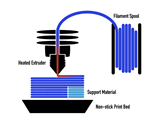
FDM is the more popular of the two. It operates by heat-depositing thermoplastic filaments like PLA (Polylactic Acid) or ABS (Acrylonitrile Butadiene Styrene) layer-by-layer on a non-stick print bed. Here, a heated nozzle or extruder (temperatures exceed 100° Celsius) lays a cross-section of the programmed model on top of the previous one. Each cross-section builds upon the one before until the model is completed, including supports to prop the model up. The printing process is fast, economical, and well-suited for both beginners and businesses on a budget.
Source: University of New South Wales
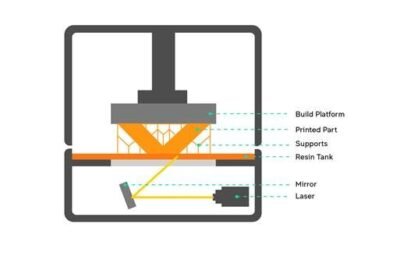
SLA takes a radically different approach. Instead of melting and fusing solid filaments, SLA printers use a tank of liquid resin. Some of the popular resins include standard resins (acrylate or epoxy-based), tough resins, flexible resins, high-temperature resins, and clear resins. The resin is cured by a laser or ultraviolet light, hardening the resin in the tank while the build platform pulls out. In the process, the 3D model is extracted along with supports. The 3D print is finely detailed with smooth finishing, often superior to what FDM can achieve, especially without additional post-processing.
It’s apparent how these two processes are built for different needs. The difference between FDM and SLA printers is a factor that can help you make a choice between the two.
What to Expect from FDM 3D Printing
You’ll find most 3D printing hobbyists lean towards FDM for its plug-and-play setup. FDM machines nowadays come kitted with better bed leveling systems and automatic calibration. Slicing software bundled with FDM printers are now improved and intuitive, making toolpath generation perfect.
The filament used in FDM printers, especially ABS and PETG, has great tensile strength. Having high impact resistance and flexibility of the built 3D models enables them to be used for functional parts, mechanical prototypes, and end-user components. So, when prosthetists need custom prosthetics for an amputee, FDM has them covered. FDM’s ability to print large 3D models without material wastage makes it a viable option for bulkier and less intricate designs.
Despite the pros of FDM, it’s not advisable to use it for detail-intensive applications, as the model surface can be rough with layer lines once printed. Layer lines are often visible, and if the temperature calibration is not proper, then the model may warp. Layer lines and minor warps can be corrected using post-processing techniques like sanding, smoothing, and painting. This however requires time and skill, which can delay the printing process and reduce value for money.
FDM redeems itself through cost and convenience. The filaments are wallet-friendly, the machines themselves don’t demand obsessive upkeep, and the internet is swarming with fellow tinkerers ready to share troubleshooting tips. If your checklist contains the words “tight budget” and “rapid prototyping” scribbled somewhere near the top, then FDM is a no-brainer.
What to Expect from SLA Printers
Being a resin-based process, SLA can capture crisp details. This makes SLA a natural choice for projects where fidelity is everything. For example, medical models with lifelike accuracy, dental molds, jewelry impressions, or sculpted Anime figurines where the subtlest texture or engraving carries the weight of the quality. More than once, we’ve had clients walk in grumbling about how their FDM-printed figurines lost the facial expressions they painstakingly modeled, only to watch SLA deliver them flawlessly.
There’s also the bonus of watertightness. SLA parts don’t suffer from the tiny gaps and porosity that plague FDM prints. They are perfect for fluid-handling jobs, be it lab nozzles, custom enclosures, or experimental equipment.
Perfection isn’t without its price when using the SLA method. It is often slower than FDM, particularly for larger builds, and resin isn’t the most economical material. Printing preparation can be messy, especially when handling resins. You’ll often need gloves, isopropyl alcohol baths, UV curing setups, and preferably a well-ventilated space unless you’re fond of the resin’s distinctive aroma. And while SLA wins on looks, it loses points for toughness. Standard resins lack the strength of ABS or PETG, which results in brittle parts that can’t take repeated physical stress.
If your project is client-facing or all about aesthetics and looks, choose SLA. But if you need something that can take a beating, churn out in large volumes, or shrug off rough handling, FDM wears the crown.
A Side-by-Side Comparison of FDM and SLA
Let’s break down the difference between FDM and SLA with a side-by-side comparison. This should help clarify which technology suits your needs best.
| Factor | FDM (Fused Deposition Modelling) | SLA (Stereolithography) |
| Print Quality | Moderate to good, visible layer lines | Excellent, smooth surfaces, high detail |
| Best for | Functional parts, enclosures, prototypes, large models | Miniatures, dental models, molds, artistic prints |
| Material Used | Thermoplastic filaments (PLA, ABS, PETG, TPU) | Liquid photopolymer resins (standard, tough, flexible, etc.) |
| Strength and Durability | High impact resistance (depending on filament) | More brittle; limited mechanical strength |
| Size Limitations | Good for large builds | Limited build volume in most desktop models |
| Print Speed | Faster for large prints | Slower, especially for large or complex models |
| Post-Processing Needs | May need sanding, smoothing, or painting | Requires cleaning and UV curing, often minimal surface finishing |
| Accuracy and Detail | Moderate detail (~100–200 microns layer height) | High detail (as fine as 25–50 microns layer height) |
| Cost of Printing | Generally cheaper (printer + filament) | Higher cost (printer + resin + post-processing tools) |
| User-Friendliness | Easier to operate and troubleshoot | Slight learning curve, more involved setup |
| Applications | Engineering parts, brackets, large-scale prototypes | Jewelry, dental, figurines, precision visual models |
| Environmental Factors | Safer to handle; biodegradable options like PLA | Requires gloves, alcohol, and proper waste disposal |
| Support Removal | Often mechanical (easy with dual-extruder setups) | Can be delicate and requires rinsing |
| Printer Maintenance | Low to moderate; occasional nozzle cleaning | Moderate to high; resin handling, tank cleaning |
Time, Cost, and Post-Processing
When getting your STL files printed, it’s more likely to underestimate the time involved in producing a 3D print. FDM prints may take longer to print due to thicker layers and unrefined details. The overall turnaround is often faster because there’s less post-processing required.
SLA, on the other hand, needs time not just for printing, but for post-curing under UV light, resin washing, and support removal, all of which require labor and specialized tools.
This leads to one of the biggest differentiators: cost. Here’s a rough idea of what you might expect when you upload a model to a printing service:
| Scenario | Estimated FDM Cost | Estimated SLA Cost |
| Small prototype (5x5x5 cm) | ₹300 – ₹600 | ₹700 – ₹1200 |
| Large mechanical part (15 cm+) | ₹1000 – ₹2500 | ₹2500 – ₹4000+ |
| Figurine or display model | ₹500 – ₹800 | ₹1200 – ₹1800 |
The pricing pattern may depend upon the type of material, finishing, and location. SLA, although visually impressive, is more expensive because of resin cost and post-processing.
Real-World Scenarios
Let’s walk you through two short examples.
You’re designing a phone stand with a rotating hinge. You don’t care about cosmetic perfection. The mechanics need to be tested to see how the angle holds. This is an ideal case for FDM. You’ll get a sturdy print quickly and cheaply, and you can iterate if needed.
On the other hand, you’ve sculpted a delicate chess piece in ZBrush with facial features, intricate base patterns, and layered texturing. You want to gift it or use it in a professional pitch. This is a classic SLA case. The model will print with high fidelity, capturing all the small details and curves as you intended.
Conclusion: Choosing Like a Pro
Ultimately, you don’t need to become an engineer to get great 3D prints. You do however, need to choose the right technology for the right purpose. As a customer, clarity about your goals is your greatest asset. Ask yourself this— “Is my model about function or form? Is detail critical? Will the part be used or just shown?”
With clarity and insights from this guide, you can outsource your 3D model to any 3D printing service confidently. It’s all about knowing which tool gets your idea off the screen and into your hands, exactly the way you imagined it.
And with that, your Blender model doesn’t just live in pixels anymore. It’s ready to rock your display case or even your toolshed.
Need a quote for your 3D printing project? Give us a holler at abc@3dprintcom!